Priyanka Adhikari

Priyanka Adhikari

Priyanka Adhikari

Case Study Title

Short summary of your case study...

Role

Client Name

Tools

Visual Design UI & UX Design

Timeline

January 2023
Banking Landing Page - Hero Section

Usability Review

With its easy-to-use design and robust construction, this product is sure to exceed your expectations and provide you with the results you're looking for. So why wait? Try it out today and experience the best that this product has to offer!

With its easy-to-use design and robust construction, this product is sure to exceed your expectations and provide you with the results you're looking for. So why wait? Try it out today and experience the best that this product has to offer!

With its easy-to-use design and robust construction, this product is sure to exceed your expectations and provide you with the results you're looking for. So why wait? Try it out today and experience the best that this product has to offer!

Business & User frustrations

User frustrations

  • Confusing entry points and unclear feedback during expense creation caused hesitation and misclicks

  • Expense categorisation required extra effort, slowing down a high-frequency task

  • Limited visibility into spending patterns made it hard to understand or improve financial habits

Business frustrations

  • Friction in core flows risked lower feature adoption and repeat usage

  • High misclick rates indicated inefficiencies that could impact user satisfaction and retention

  • Lack of proactive insights limited the product’s ability to drive long-term engagement and value

User frustrations

  • Confusing entry points and unclear feedback during expense creation caused hesitation and misclicks

  • Expense categorisation required extra effort, slowing down a high-frequency task

  • Limited visibility into spending patterns made it hard to understand or improve financial habits

Business frustrations

  • Friction in core flows risked lower feature adoption and repeat usage

  • High misclick rates indicated inefficiencies that could impact user satisfaction and retention

  • Lack of proactive insights limited the product’s ability to drive long-term engagement and value

User frustrations

  • Confusing entry points and unclear feedback during expense creation caused hesitation and misclicks

  • Expense categorisation required extra effort, slowing down a high-frequency task

  • Limited visibility into spending patterns made it hard to understand or improve financial habits

Business frustrations

  • Friction in core flows risked lower feature adoption and repeat usage

  • High misclick rates indicated inefficiencies that could impact user satisfaction and retention

  • Lack of proactive insights limited the product’s ability to drive long-term engagement and value

Primary Frustration

Primary Frustration

Primary Frustration

When logging expenses, users are slowed by unclear visual hierarchy and feedback, which results in lower engagement and reduced feature adoption.

Secondary Frustration

Secondary Frustration

Secondary Frustration

When viewing expense history, users are presented with raw data rather than insights, which results in reduced engagement and weaker long-term retention.

Competitor Benchmarking
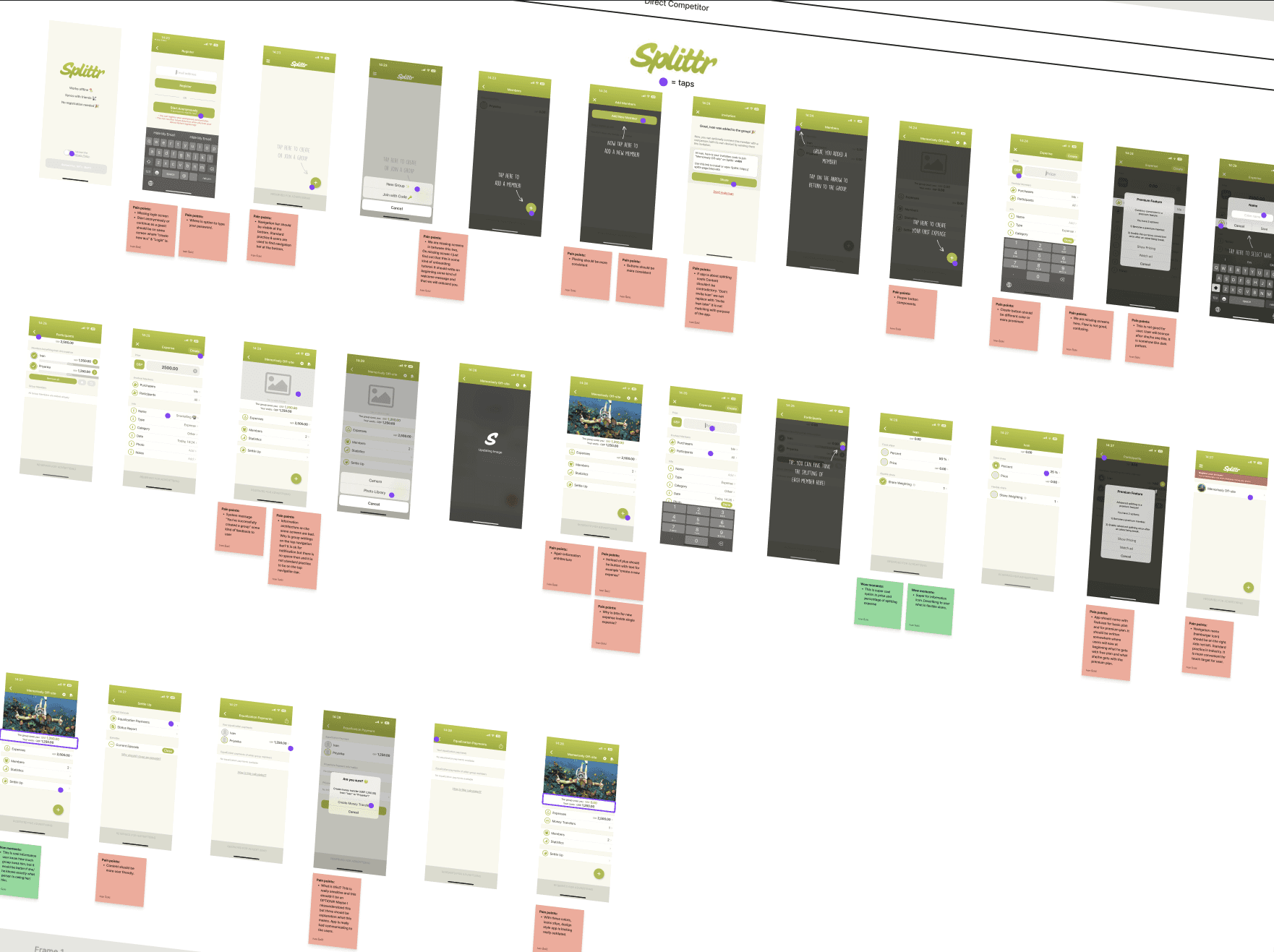
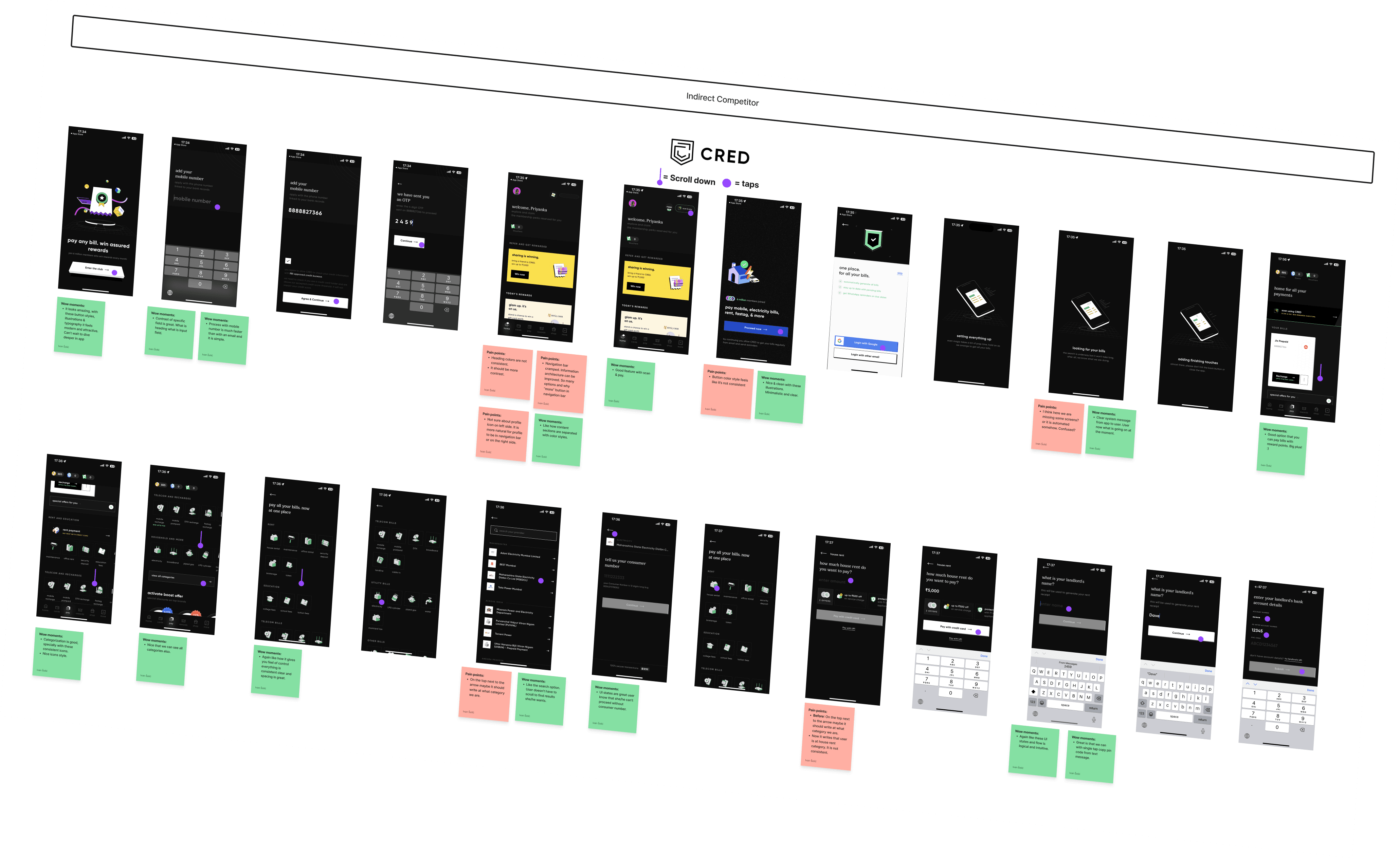
We benchmarked Splitter as a direct competitor to understand core expense-splitting flows and feature parity, and CRED as an indirect competitor to study best-in-class financial UX patterns.

Key learnings included:

  • Splitter helped validate expected user behaviours and baseline functionality for expense creation and group management.

  • CRED’s horizontal and vertical scrolling patterns inspired the redesigned Splitwise experience, demonstrating how complex financial information can be broken into digestible, swipeable sections without overwhelming users.

These insights informed a more intuitive, modern layout that balances clarity with engagement while maintaining familiar expense-tracking behaviours.

We benchmarked Splitter as a direct competitor to understand core expense-splitting flows and feature parity, and CRED as an indirect competitor to study best-in-class financial UX patterns.

Key learnings included:

  • Splitter helped validate expected user behaviours and baseline functionality for expense creation and group management.

  • CRED’s horizontal and vertical scrolling patterns inspired the redesigned Splitwise experience, demonstrating how complex financial information can be broken into digestible, swipeable sections without overwhelming users.

These insights informed a more intuitive, modern layout that balances clarity with engagement while maintaining familiar expense-tracking behaviours.

We benchmarked Splitter as a direct competitor to understand core expense-splitting flows and feature parity, and CRED as an indirect competitor to study best-in-class financial UX patterns.

Key learnings included:

  • Splitter helped validate expected user behaviours and baseline functionality for expense creation and group management.

  • CRED’s horizontal and vertical scrolling patterns inspired the redesigned Splitwise experience, demonstrating how complex financial information can be broken into digestible, swipeable sections without overwhelming users.

These insights informed a more intuitive, modern layout that balances clarity with engagement while maintaining familiar expense-tracking behaviours.

Problem Space

The research and usability review revealed that while users can complete core expense-tracking tasks, friction at key decision points—such as entering an expense and selecting a category—creates hesitation and reduces confidence during frequent interactions.

These issues impact both user experience (slower task completion, uncertainty) and business outcomes (lower engagement and feature adoption). To address this, we framed a How Might We question to explore ways to simplify decision-making, improve feedback, and help users move through expense tracking with clarity and confidence.

The research and usability review revealed that while users can complete core expense-tracking tasks, friction at key decision points—such as entering an expense and selecting a category—creates hesitation and reduces confidence during frequent interactions.

These issues impact both user experience (slower task completion, uncertainty) and business outcomes (lower engagement and feature adoption). To address this, we framed a How Might We question to explore ways to simplify decision-making, improve feedback, and help users move through expense tracking with clarity and confidence.

The research and usability review revealed that while users can complete core expense-tracking tasks, friction at key decision points—such as entering an expense and selecting a category—creates hesitation and reduces confidence during frequent interactions.

These issues impact both user experience (slower task completion, uncertainty) and business outcomes (lower engagement and feature adoption). To address this, we framed a How Might We question to explore ways to simplify decision-making, improve feedback, and help users move through expense tracking with clarity and confidence.

How might we help users log expenses quickly and confidently by reducing friction and uncertainty at key decision points?

Ideation
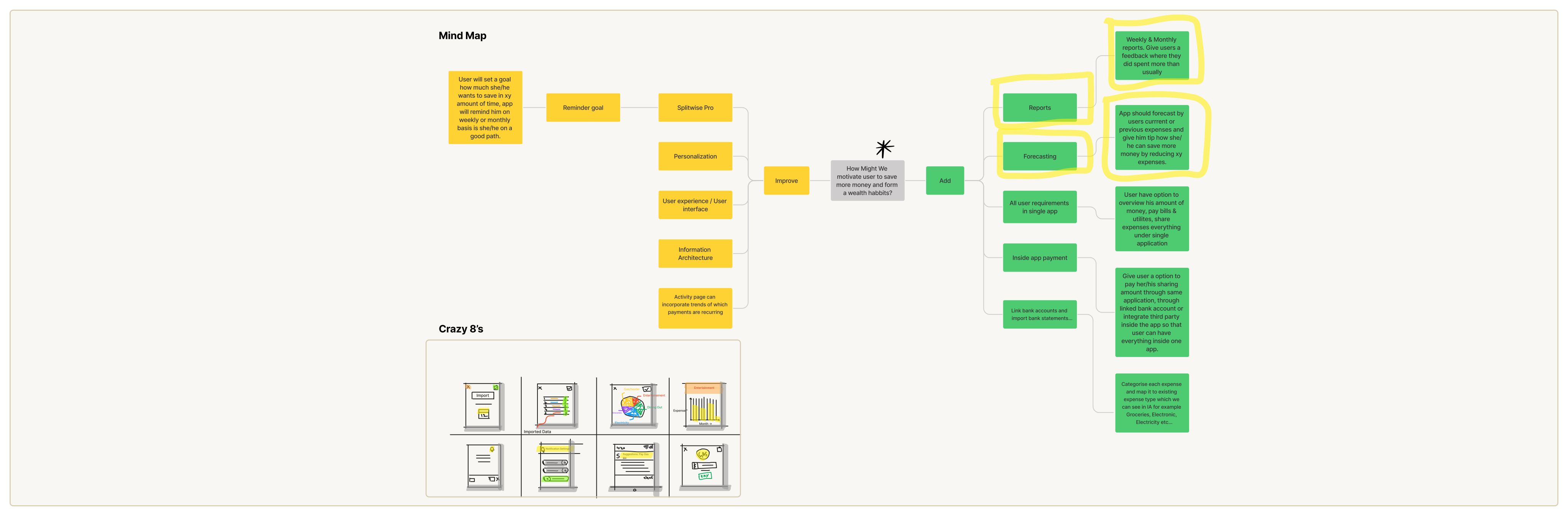
We used mind mapping and Crazy 8s to ideate creatively, aligning user needs with business goals to generate innovative product solutions.

We used mind mapping and Crazy 8s to ideate creatively, aligning user needs with business goals to generate innovative product solutions.

We used mind mapping and Crazy 8s to ideate creatively, aligning user needs with business goals to generate innovative product solutions.

What can we add

What can we add

What can we add

  • Smart insights through reports & forecasting

    Introduce weekly and monthly reports combined with expense forecasting to help users understand spending patterns and make informed saving decisions. By analysing past expenses and highlighting anomalies (for example, spending more than usual in a category), the app can proactively guide users on where they can cut back and how close they are to their savings goals.

  • Why this matters:
    This addition moves the product from being a passive expense tracker to an active financial guide, directly supporting the user’s long-term goal of building better saving habits while increasing engagement and retention for the business.

What can we improve

What can we improve

What can we improve

  • Expense categorisation clarity and feedback

    Improve the expense categorisation experience by making categories easier to understand, visually distinct, and more responsive after selection. Clear confirmation states, better grouping, and smarter defaults (based on past behaviour or imported data) can reduce hesitation and misclicks during categorisation.

  • Why this matters:
    Expense categorisation is a high-frequency action. Improving clarity and feedback here reduces friction, speeds up task completion, and increases user confidence—making expense logging feel effortless rather than tedious.

User Flows

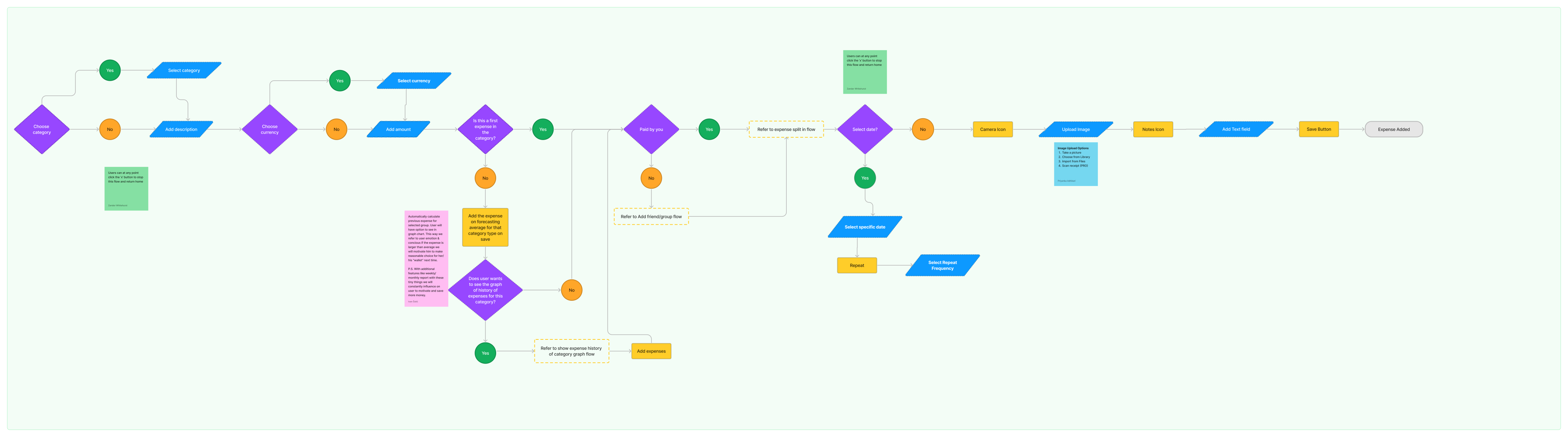
I mapped and improved three core user flows to reduce friction and support better financial habits:

  • Add Expense flow: Streamlined the end-to-end journey from entry to save, clarifying decision points like category, frequency, and payment to make expense logging fast and intuitive.

  • Expense History & Insights flow: Enhanced how users review past expenses by introducing frequency-based views, averages, and visual trends to turn raw data into actionable insights.

  • Add Friend / Group flow: Simplified validation and exit points to make adding friends or groups quick, flexible, and error-tolerant.

Overall, the improved flows reduce cognitive load, improve clarity at key moments, and shift the experience from simple tracking to guided financial awareness.

I mapped and improved three core user flows to reduce friction and support better financial habits:

  • Add Expense flow: Streamlined the end-to-end journey from entry to save, clarifying decision points like category, frequency, and payment to make expense logging fast and intuitive.

  • Expense History & Insights flow: Enhanced how users review past expenses by introducing frequency-based views, averages, and visual trends to turn raw data into actionable insights.

  • Add Friend / Group flow: Simplified validation and exit points to make adding friends or groups quick, flexible, and error-tolerant.

Overall, the improved flows reduce cognitive load, improve clarity at key moments, and shift the experience from simple tracking to guided financial awareness.

I mapped and improved three core user flows to reduce friction and support better financial habits:

  • Add Expense flow: Streamlined the end-to-end journey from entry to save, clarifying decision points like category, frequency, and payment to make expense logging fast and intuitive.

  • Expense History & Insights flow: Enhanced how users review past expenses by introducing frequency-based views, averages, and visual trends to turn raw data into actionable insights.

  • Add Friend / Group flow: Simplified validation and exit points to make adding friends or groups quick, flexible, and error-tolerant.

Overall, the improved flows reduce cognitive load, improve clarity at key moments, and shift the experience from simple tracking to guided financial awareness.

Rapid Prototyping

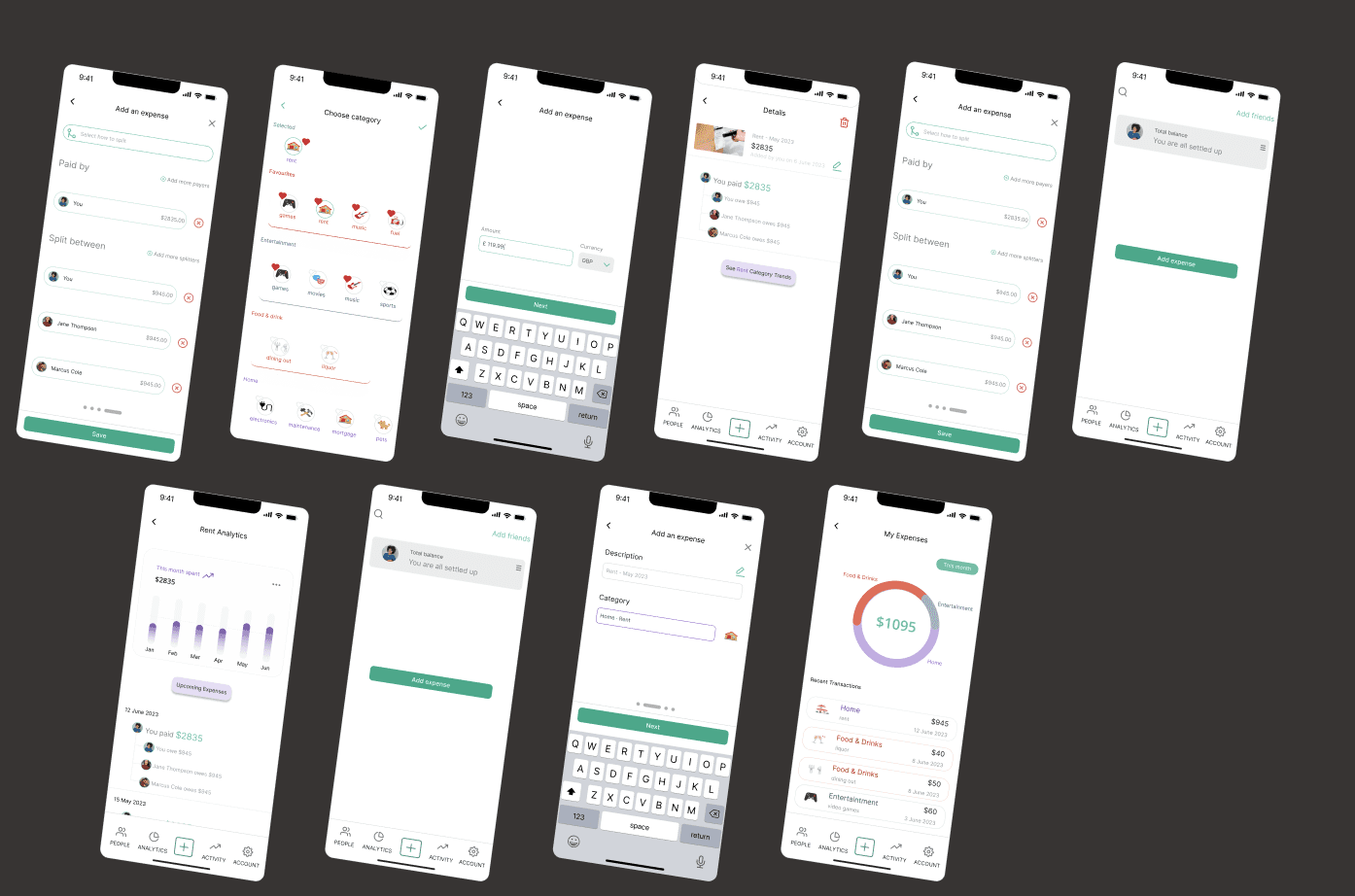
I created high-fidelity prototypes in Figma, translating insights from the wireframes and ideation phase into interactive user flows.

I created high-fidelity prototypes in Figma, translating insights from the wireframes and ideation phase into interactive user flows.

I created high-fidelity prototypes in Figma, translating insights from the wireframes and ideation phase into interactive user flows.

Styles & Components

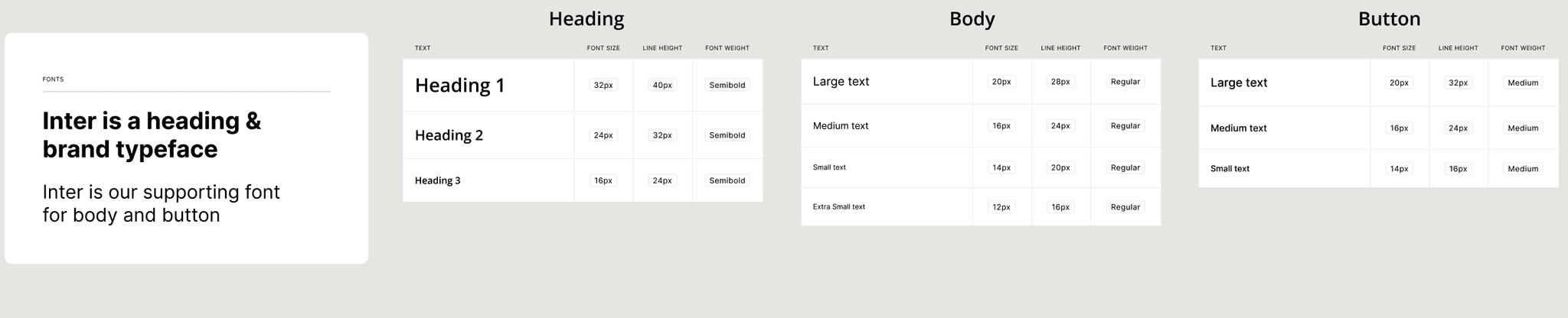
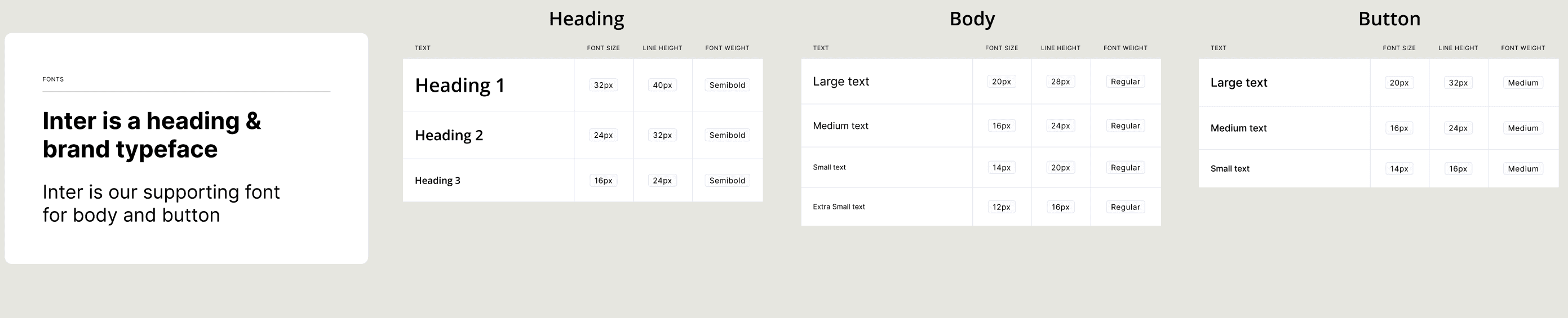
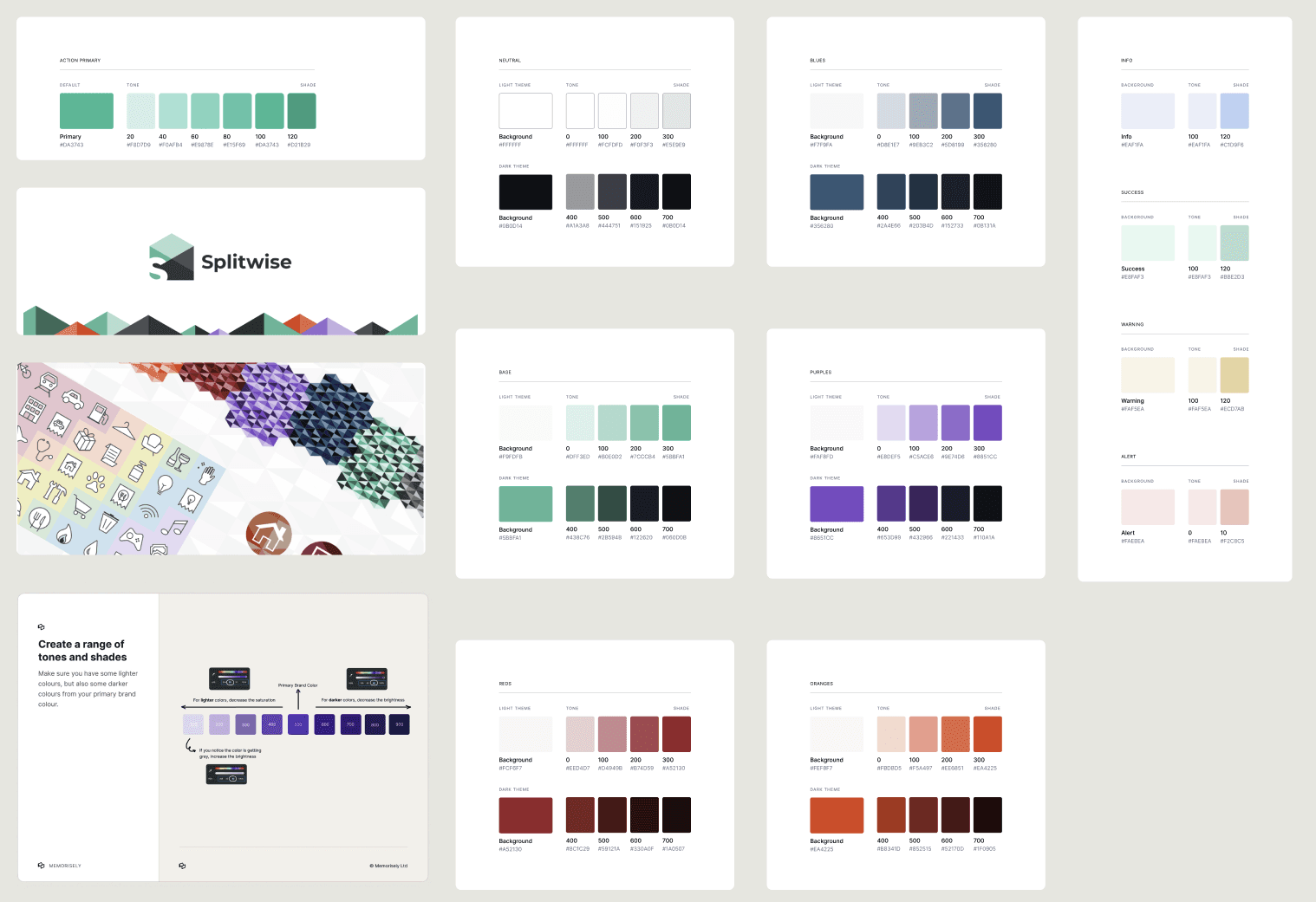
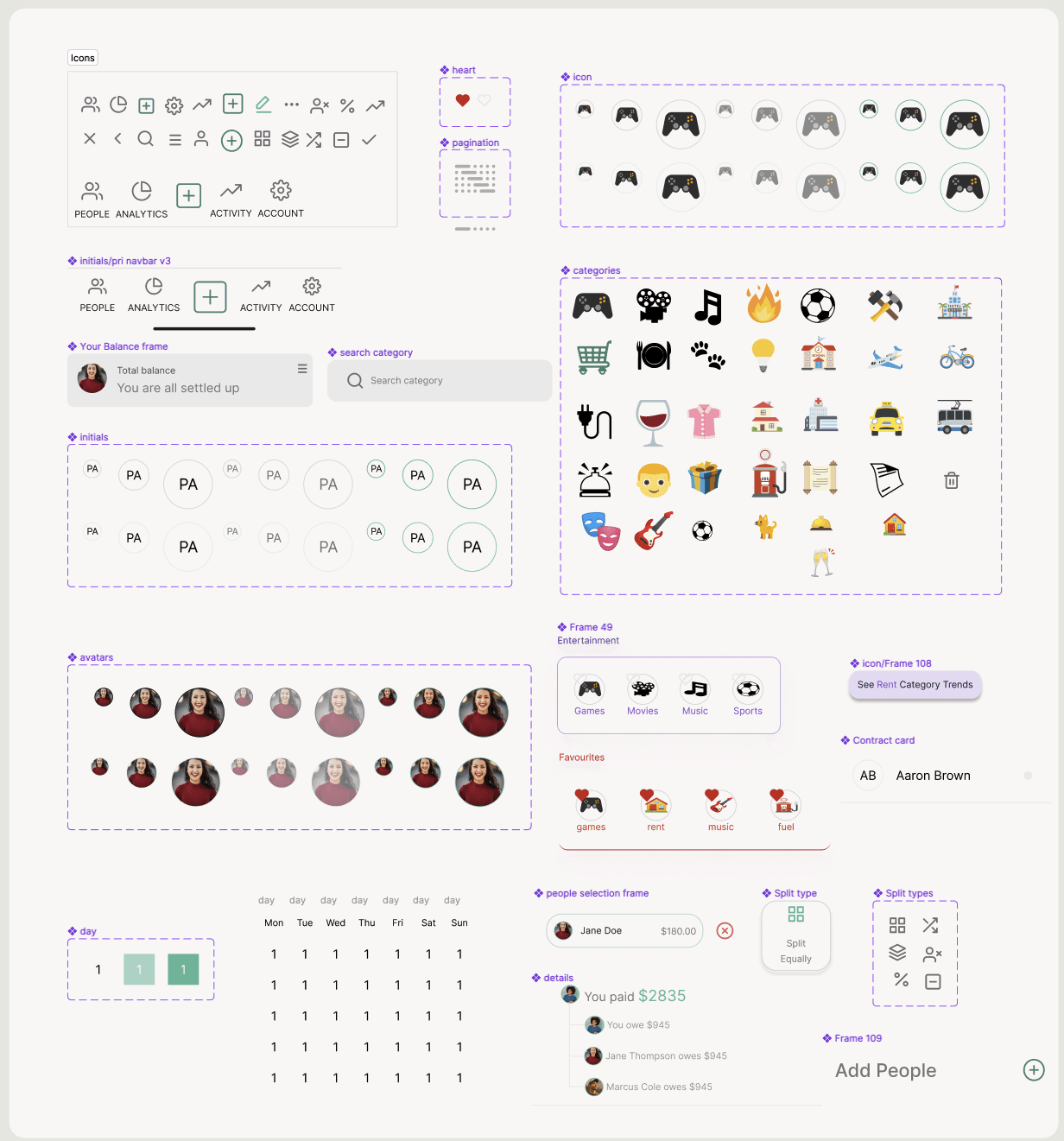
Presenting the meticulously crafted color styles, text styles, versatile button components, and thoughtfully defined variables developed for the application's design.

Presenting the meticulously crafted color styles, text styles, versatile button components, and thoughtfully defined variables developed for the application's design.

Presenting the meticulously crafted color styles, text styles, versatile button components, and thoughtfully defined variables developed for the application's design.

High Fidelity Prototype

Innovatively streamlined expense creation with integrated features for upcoming expenses and insightful historic expense charts in the final high-fidelity prototype.

Innovatively streamlined expense creation with integrated features for upcoming expenses and insightful historic expense charts in the final high-fidelity prototype.

Innovatively streamlined expense creation with integrated features for upcoming expenses and insightful historic expense charts in the final high-fidelity prototype.

Usability Testing

We conducted usability testing on the Add Expense flow to evaluate ease of navigation, clarity of actions, and overall task efficiency across the expected user journey.

We conducted usability testing on the Add Expense flow to evaluate ease of navigation, clarity of actions, and overall task efficiency across the expected user journey.

We conducted usability testing on the Add Expense flow to evaluate ease of navigation, clarity of actions, and overall task efficiency across the expected user journey.

Test outcomes

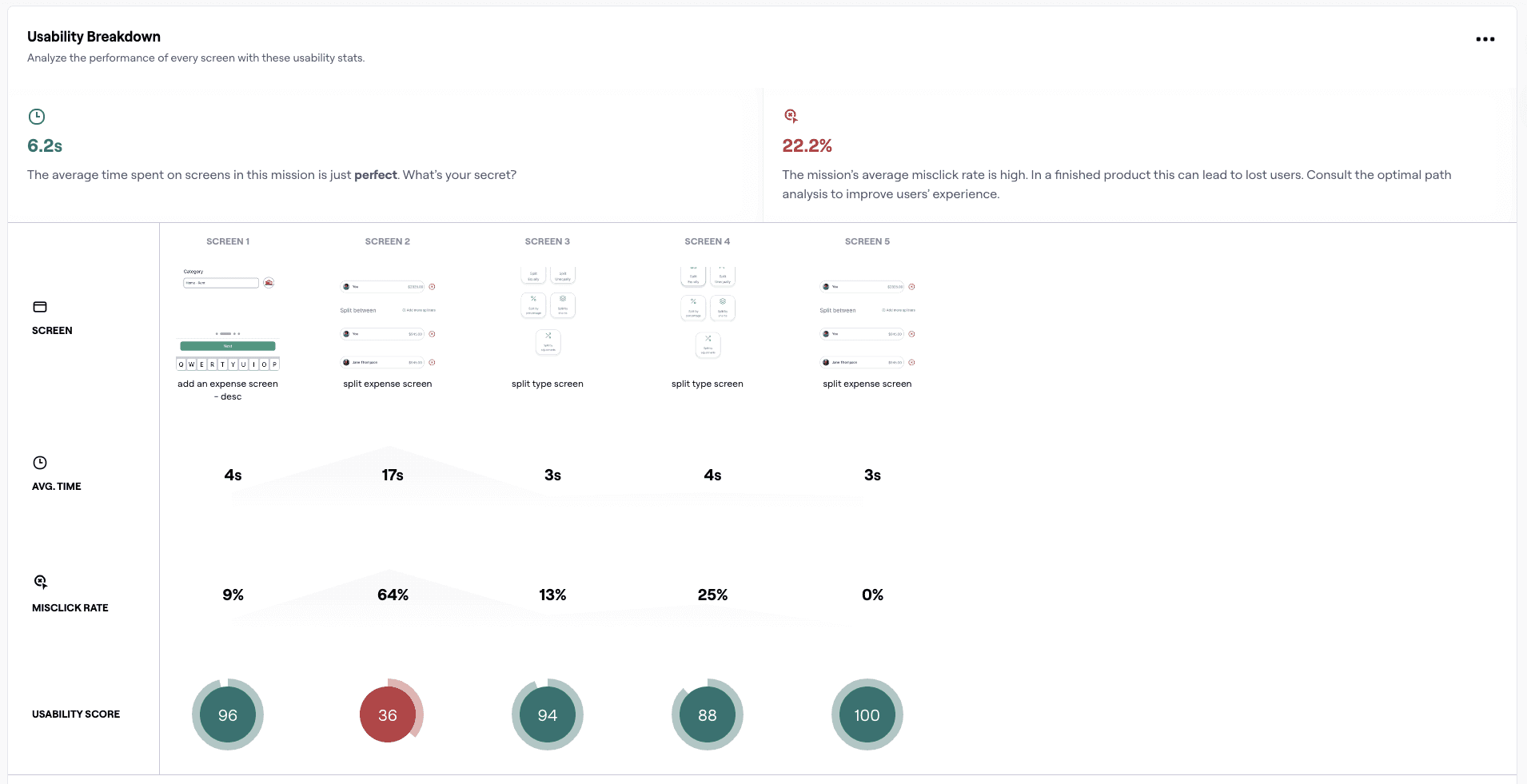
Having tested the prototype, I learned that users can complete the Add Expense flow quickly and with high confidence once they enter the flow, but initial entry and category selection create avoidable friction due to unclear visual hierarchy and feedback. Addressing these issues should improve task completion efficiency and reduce user errors, supporting the business goal of faster expense logging and higher feature adoption, while helping users add expenses with greater speed and confidence.

Having tested the prototype, I learned that users can complete the Add Expense flow quickly and with high confidence once they enter the flow, but initial entry and category selection create avoidable friction due to unclear visual hierarchy and feedback. Addressing these issues should improve task completion efficiency and reduce user errors, supporting the business goal of faster expense logging and higher feature adoption, while helping users add expenses with greater speed and confidence.

Having tested the prototype, I learned that users can complete the Add Expense flow quickly and with high confidence once they enter the flow, but initial entry and category selection create avoidable friction due to unclear visual hierarchy and feedback. Addressing these issues should improve task completion efficiency and reduce user errors, supporting the business goal of faster expense logging and higher feature adoption, while helping users add expenses with greater speed and confidence.

Three key learnings

  1. Clear visual hierarchy at entry points is critical
    The highest misclick rate occurred on the initial “Add Expense” screen, indicating that users struggled to identify the primary action. Strengthening CTA prominence can significantly reduce confusion at the start of the flow.

  2. Immediate feedback after selection improves user confidence
    Users hesitated after selecting a category, suggesting uncertainty about whether their action was successful. Clear confirmation states can prevent misclicks and speed up completion.

  3. Once users understand the flow, efficiency increases sharply
    Screens involving amount and description entry showed high usability scores and low time-on-screen, confirming that simple, focused steps support fast and error-free interactions.

Next steps

With more time to iterate, I would:

  • Refine the Add Expense entry screen by improving CTA contrast, spacing, and prioritisation

  • Introduce clear visual feedback after category selection (confirmation state or microcopy)

  • Re-test the updated flow using Maze to validate reductions in misclick rates

  • Measure improvements in task success, time on task, and user confidence

With more time to iterate, I would:

  • Refine the Add Expense entry screen by improving CTA contrast, spacing, and prioritisation

  • Introduce clear visual feedback after category selection (confirmation state or microcopy)

  • Re-test the updated flow using Maze to validate reductions in misclick rates

  • Measure improvements in task success, time on task, and user confidence

With more time to iterate, I would:

  • Refine the Add Expense entry screen by improving CTA contrast, spacing, and prioritisation

  • Introduce clear visual feedback after category selection (confirmation state or microcopy)

  • Re-test the updated flow using Maze to validate reductions in misclick rates

  • Measure improvements in task success, time on task, and user confidence

Priyanka Adhikari

Product Designer

Priyanka Adhikari

Product Designer

Memorisely · Learn Live & Together

© Memorisely Ltd

Priyanka Adhikari

Product Designer

Memorisely · Learn Live & Together

© Memorisely Ltd

Create a free website with Framer, the website builder loved by startups, designers and agencies.